Moving my blog from Vercel to Cloudflare
Why this blog moved from Next.js on Vercel to a static Astro site on a Cloudflare Worker, the tools behind it, and what the move did for performance
On this page
This blog has run on Next.js and Vercel for years. As of today, it is a static Astro site served by a Cloudflare Worker, with the infrastructure (DNS included) declared in code.
This blog post covers why I moved, what the old site looked like, the tools I used for the new one, the optimisations I made along the way, and some before and after numbers.
Vercel paused my site
The move had been on my list for a long time. Most of my larger applications already live on AWS and Cloudflare, and the blog was the odd one out on a third platform. What finally forced my hand was Vercel pausing the site.
Eight hours into my 30-day billing cycle, the blog had used all 1,000,000 of the edge requests included in Vercel's free Hobby plan. Vercel paused the deployment, so anyone visiting got a "This deployment is temporarily paused" page instead of the blog, and new deployments were blocked for the rest of the month.
Most of that traffic was referred by a single domain, www.aocr.org. To be fair to Vercel, its firewall would have helped. IP blocking and custom rules are free on every plan, and traffic they block does not count towards your usage. I simply had no rules in place, and eight hours is not long to notice. The features that would have caught the next storm on their own, rate limiting and managed rulesets, are billed by usage on Pro, and Hobby gets a single rate limiting rule per project.
I could have set those rules up and stayed. But with most of my other work already on AWS and Cloudflare, this was a good opportunity to make the move I had been putting off, to a setup built around my own requirements.
So the requirements for the replacement were:
- Reading the blog should cost nothing, however much traffic arrives.
- Junk traffic should be stopped before it costs anything at all.
- Every existing URL, image and feed entry must keep working.
- Everything should be reviewable and repeatable in code, rather than clicked together in dashboards.
Where we started
The old site was a Next.js 16 application with around 350 posts written in MDX. A few other moving parts sat around it:
- Images were already served from
cdn.dennisokeeffe.com, an S3 bucket behind CloudFront. - Newsletter sign-ups went to Mailchimp, with an older list sitting in a DynamoDB table.
- Analytics came from Simple Analytics and the full PostHog JavaScript library.
- DNS for
dennisokeeffe.comlived in a Route 53 hosted zone, with the blog itself answering onblog.dennisokeeffe.com.
Next.js did its job, but for a site that is almost entirely static text, every page was shipping 400 KB to 700 KB of JavaScript, and the blog index made over 400 requests on a first visit thanks to prefetching.
What we moved to
The new blog is a static Astro build, served as static assets by a single Cloudflare Worker. The Worker only runs code for one route, the newsletter sign-up. Every other request is a static file that Cloudflare serves without running the Worker at all.
The redirects and the WAF rules are separate pieces. Redirect rules send www and blog to the main domain, while the WAF only blocks traffic. Path redirects, such as old /assets image URLs pointing at the CDN, live in a _redirects file that ships with the static files.
This shape covers the first two requirements:
- Requests for static assets are free and unmetered on Workers, so a crawler storm costs nothing and takes nothing offline. Only
/api/*counts towards the free plan's 100,000 Worker requests a day. - Cloudflare's WAF custom rules block known bad referrers (hello
aocr.org), and a rate limiting rule blocks any IP that makes more than 120 requests in 10 seconds. Both run before a file is served and are available on the free plan.
The main tools behind the new site:
| Area | Old site | New site |
|---|---|---|
| Framework | Next.js 16 | Astro 7, fully static |
| Hosting | Vercel (Hobby) | Cloudflare Workers static assets |
| DNS | Route 53 | Cloudflare, declared in code |
| Infrastructure | Vercel dashboard | Alchemy |
| Newsletter | Mailchimp and DynamoDB | Effect Worker, D1 and Turnstile |
| Analytics | Simple Analytics and PostHog | Simple Analytics and posthog-js-lite |
Infrastructure with Alchemy
Everything Cloudflare runs is declared in one TypeScript file using Alchemy: the D1 database and its migrations, the Turnstile widget, the site build, the Worker with its domains and redirects, the WAF rules, and the DNS zone with every record copied across from Route 53.
Alchemy has a plan command that shows what a deploy would change before it changes anything, which is a habit I have come to rely on with Pulumi on other projects. The same stack also has a preview stage, which deployed the new site to next.dennisokeeffe.com so I could compare it against the old one before switching over.
The newsletter Worker
The only code path the Worker runs is POST /api/subscribe. It is written with Effect, with each step named so that it shows up in the request's log line:
- Check the request comes from the blog's own origin.
- Rate limit to five attempts per IP per minute, using the Workers rate limiting binding.
- Decode the body against a schema, with a honeypot field that quietly "succeeds" for bots.
- Verify the Turnstile token.
- Upsert the address into D1.
Each request writes a single JSON log line (a "wide event") with the outcome, the reason and the steps it reached, so a failed sign-up can be explained from one log entry.
Keeping old URLs working
With 350 posts and years of inbound links, breaking URLs was the biggest risk. A few things guard against it:
- The old site's full URL list and feed entry ids were frozen into a fixture, and a test checks every one of them still resolves or redirects to the right place.
www.dennisokeeffe.comandblog.dennisokeeffe.comanswer with a 301 to the same path and query ondennisokeeffe.com, using a Cloudflare redirect rule that runs before the Worker.- Feed entries keep the ids they had on the old site, so feed readers do not show old posts as new.
- During the migration, a set of parity scripts compared the text of every page against the old build.
Optimisations
Moving to a static site removes most of the JavaScript by itself, but there were a few deliberate optimisations on top.
Little to no JavaScript
Most pages ship about 3 KB of JavaScript. The pieces that need more only load when they are needed:
- Search is Pagefind, and its index only loads the first time you focus a search box.
- Diagrams (like the one above) are rendered to SVG at build time.
- The few interactive posts use Preact islands that hydrate when they scroll into view.
- Code highlighting is done at build time with Shiki, with the light and dark themes in a single pass.
Fonts
The blog is set in Space Mono, as before. This post from Shu Ding on making web fonts load faster without changing how anything looks inspired the approach here.
Each weight is split into two files. A Latin core file is preloaded, and a Latin Extended file sits behind unicode-range, so it only downloads on a page that uses one of its characters. Font files are self-hosted and cached for a week, and everything in /_astro carries a content hash and is cached for a year.
Analytics
Simple Analytics came across as is, served from my own subdomain, and only loads on dennisokeeffe.com itself, so local builds and previews stay out of the numbers.
The full PostHog library weighed in at around 100 KB compressed, which is more than the rest of a page put together. I swapped it for posthog-js-lite, which is about 23 KB and only sends pageviews. Both scripts wait until the browser is idle before loading, so they never get in the way of reading.
Results
I measured both sites as production builds on the same machine (next build && next start for the old site, wrangler dev for the new one), using Lighthouse with mobile throttling. Each page was run three times, and the tables use the median. Images and analytics were excluded on both sides so the comparison is of the sites themselves.
Lighthouse (mobile, lab)
| Page | Score (old to new) | Total Blocking Time (old to new) | First Contentful Paint (old to new) |
|---|---|---|---|
| Home | 93 to 100 | 314 ms to 26 ms | 0.79s to 0.77s |
| Blog index | 93 to 100 | 325 ms to 61 ms | 0.95s to 0.92s |
| Long post | 84 to 100 | 643 ms to 38 ms | 0.78s to 0.92s |
| Post with diagrams | 90 to 100 | 428 ms to 26 ms | 0.78s to 0.77s |
| Tags | 96 to 100 | 219 ms to 26 ms | 0.63s to 0.77s |
The biggest change is Total Blocking Time, which is the time the main thread is too busy running JavaScript to respond to a reader. It dropped by 80% to 95% on every page.
First visit (without images)
| Page | Old site | New site |
|---|---|---|
| Home | 671 KB, 95 requests | 76 KB, 10 requests |
| Blog index | 2,131 KB, 422 requests | 101 KB, 10 requests |
| Long post | 688 KB, 88 requests | 88 KB, 11 requests |
| Post with diagrams | 881 KB, 85 requests | 129 KB, 17 requests |
| Tags | 646 KB, 192 requests | 74 KB, 10 requests |
The new site's numbers include posthog-js-lite. A first visit now costs between a sixth and a twentieth of what it used to.
PageSpeed Insights
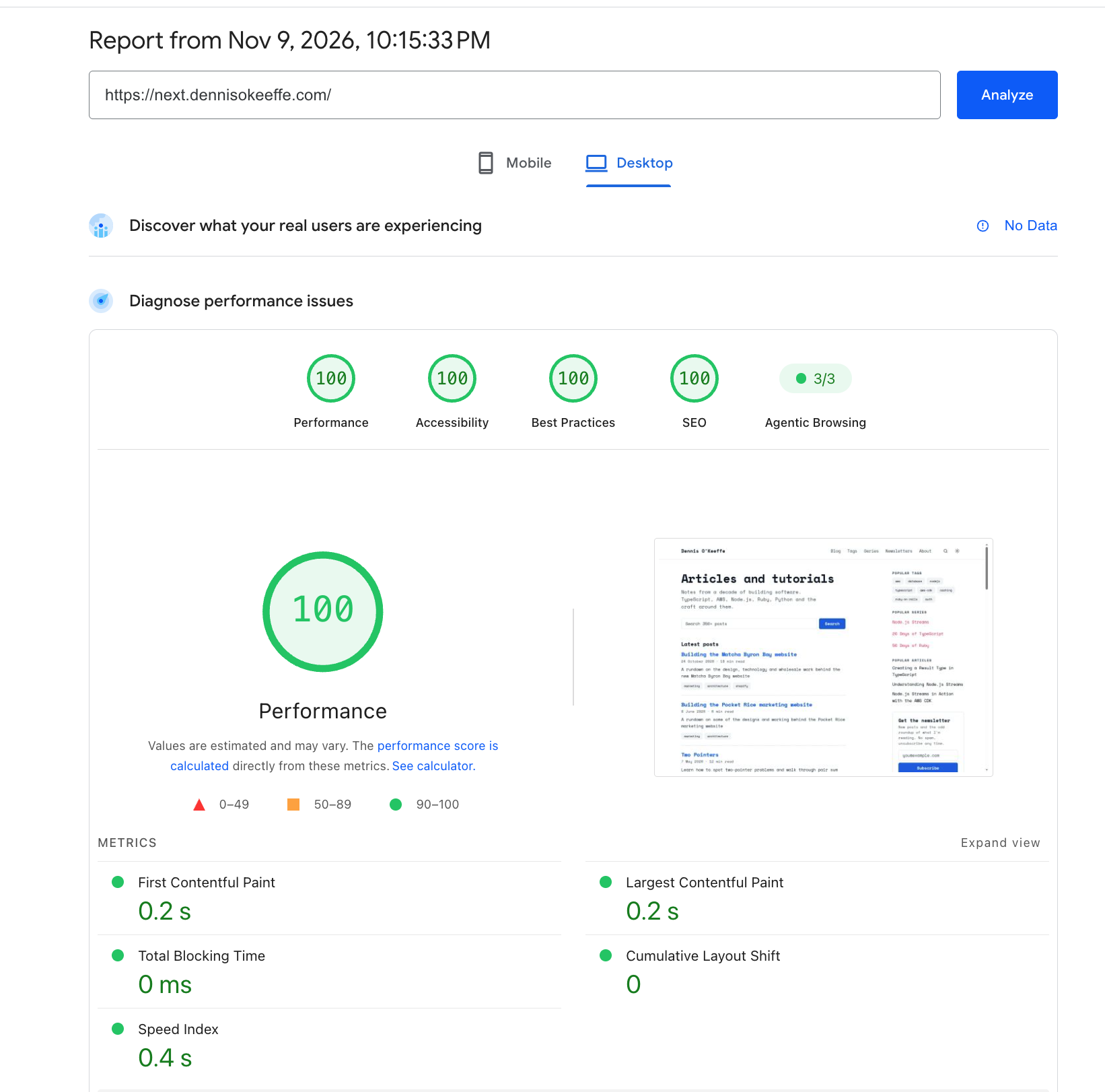
I could not run PageSpeed Insights against the old live site, since Vercel had paused it. The new site on next.dennisokeeffe.com scored 100 across performance, accessibility, best practices and SEO on desktop, with a 0.2s first contentful paint and no blocking time.
Moving DNS to Cloudflare
A Worker can only answer on a custom domain whose zone is on Cloudflare, so DNS had to move too. The domain registration stays with AWS, and only the nameservers changed.
I exported the Route 53 hosted zone and turned every record into code: mail (Zoho, Amazon SES, Resend and SendGrid), domain verifications, certificate validations and the other sites I run on subdomains. None of them are proxied, so each answers exactly as it did on Route 53. After a deploy to create the zone, the switch itself was one AWS CLI command to point the domain at Cloudflare's nameservers.
A few things tripped me up along the way, which I have noted in the repository's deploy docs:
- A stale
CLOUDFLARE_API_TOKENleft in my shell took precedence over every login I tried, and failed every plan with aForbidden: Authentication error. - I had added and then deleted the zone in the dashboard after Alchemy had recorded it. Alchemy kept looking up a zone that no longer existed until I cleared its state for that stage.
- When a zone is added in the dashboard, Cloudflare copies in records of its own. One of them was an A record for
cdn, which clashed with the CNAME to CloudFront and had to be deleted by hand.
What is next
- Deploys from CI on merge, and a preview URL for each pull request.
- Cutting the fonts down to the characters the blog actually uses.
- Bringing the old Mailchimp and DynamoDB subscribers across into D1.
- Actually sending a newsletter again.
Links and further reading
- Shu Ding on optimising web fonts
- Vercel limits
- Astro
- Cloudflare Workers
- Workers static assets billing and limitations
- Cloudflare WAF custom rules
- Cloudflare rate limiting rules
- Workers rate limiting binding
- Cloudflare D1
- Cloudflare Turnstile
- Alchemy
- Effect
- Pagefind
- Shiki
- Preact
- Storybook
- posthog-js-lite
- Simple Analytics
- Fontsource
- Lighthouse
- PageSpeed Insights